aorta
Running the Benchmark
This guide covers different ways to launch the AORTA benchmark on CUDA and ROCm systems.
Quick Start
ROCm
bash scripts/launch_rocm.sh config/default.yaml
CUDA
bash scripts/launch_cuda.sh config/default.yaml
Both scripts:
- Default to
config/default.yamlbut accept an override as the first argument - Query
torch.cuda.device_count()to size--nproc_per_node - Fall back gracefully when detection fails
- Export
PYTHONPATH=$REPO_ROOT/srcso theaortapackage is discoverable
Direct Invocation
For more control over the launch:
torchrun --nproc_per_node 4 train.py --config config/default.yaml --override training.max_steps=100
Use dotted --override arguments to mutate configuration values without editing the YAML file.
Torch Compile Acceleration
Enable AOT compilation by toggling the compile block or CLI overrides:
torchrun --nproc_per_node 4 train.py \
  --config config/default.yaml \
  --override compile.enabled=true compile.backend=inductor compile.mode=max-autotune
Compile Behavior
- The toolkit compiles the FSDP-wrapped model and falls back gracefully if
torch.compileraises (logging the reason). - On ROCm,
torch.compilewithbackend=inductoris still experimental; the launcher automatically downgrades to the saferaot_eagerbackend when necessary. - You can override this by explicitly passing another backend (e.g.,
compile.backend=aot_eager). - Tune
compile.fullgraph,compile.dynamic, orcompile.options(passed directly totorch.compile) to match your workload characteristics. - Compilation occurs per rank, so expect extra time on the first iteration; subsequent steps reuse the optimized graph.
SDMA Prototype Benchmark
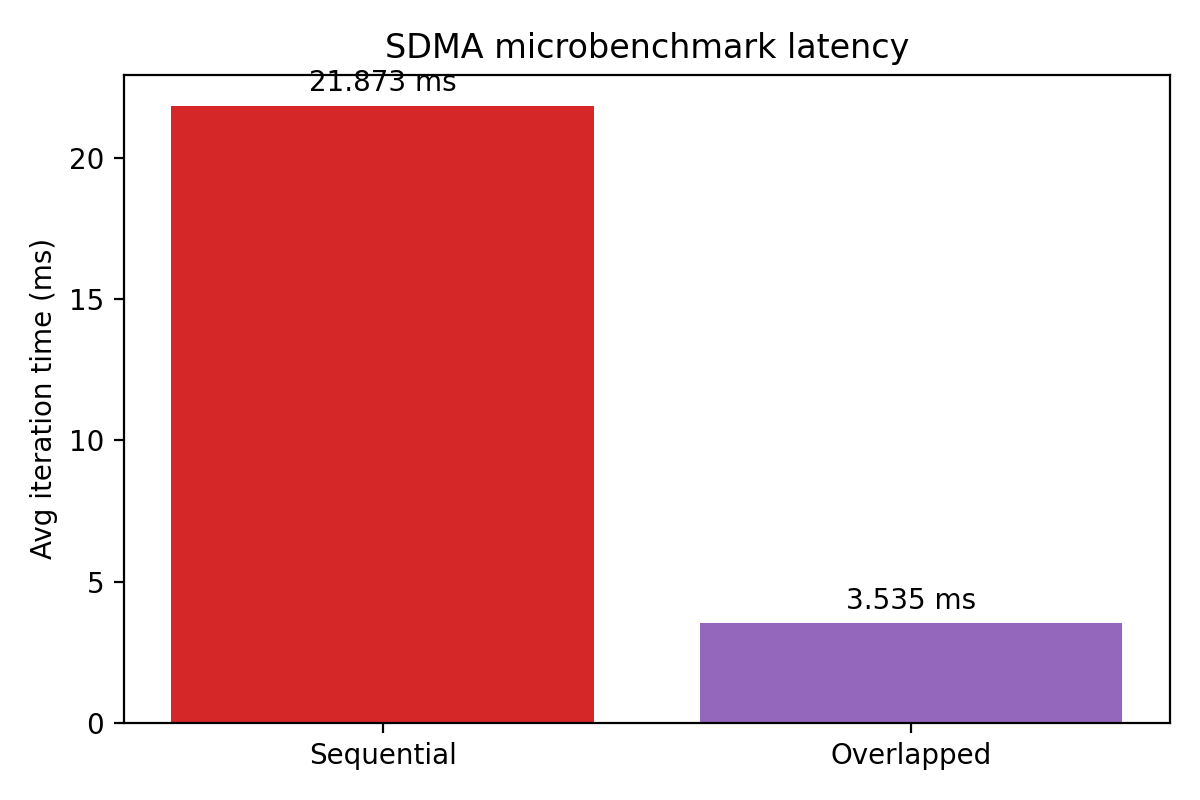
To measure theoretical compute/SDMA overlap on ROCm without modifying the full training loop:
python scripts/run_sdma_prototype.py --device 0 --matrix-size 4096 --copy-mb 64
The script:
- Launches GEMM-heavy kernels on one stream while issuing
hipMemcpyAsynctransfers on a high-priority stream - Reports the average duration with and without overlap plus the estimated savings
Use rocprofv3 (or scripts/rocprof_capture.sh) against this benchmark to inspect SDMA engine utilization and validate whether transfers run concurrently with compute.
Next Steps
- Configuration Guide - Tune model and training parameters
- Profiling Guide - Capture and analyze traces